Home › Deliverability Hub › Playbooks › Inboxing Playbook
The 2026 Inboxing Playbook
A clean operator guide for building cold email infrastructure that survives longer, routes smarter, and keeps campaigns out of spam.
"Cold email inboxing in 2026 is not about finding one magic setting. The operators who win treat inboxing like a system."
Cold email inboxing in 2026 is not about finding one magic setting.
It is not just SPF, DKIM, DMARC. It is not just warming up inboxes. It is not just buying more domains. It is not just writing "less spammy" copy.
The operators who win now are the ones who treat inboxing like a system. That system has five moving parts:
- Infrastructure diversity
- Domain and inbox architecture
- Copy and fingerprint control
- Routing by recipient type
- Testing, monitoring, and rotation
When those pieces work together, campaigns last longer. When one piece breaks, the whole setup gets fragile fast.
This playbook gives you the clean version: what to build, what to avoid, and how to think about inboxing when mailbox providers are more aggressive than ever.
The big idea: stop building infrastructure that depends on one provider, one domain pool, one copy angle, or one inboxing signal. In 2026, resilience comes from controlled diversity.
What this system produces, from our own campaigns
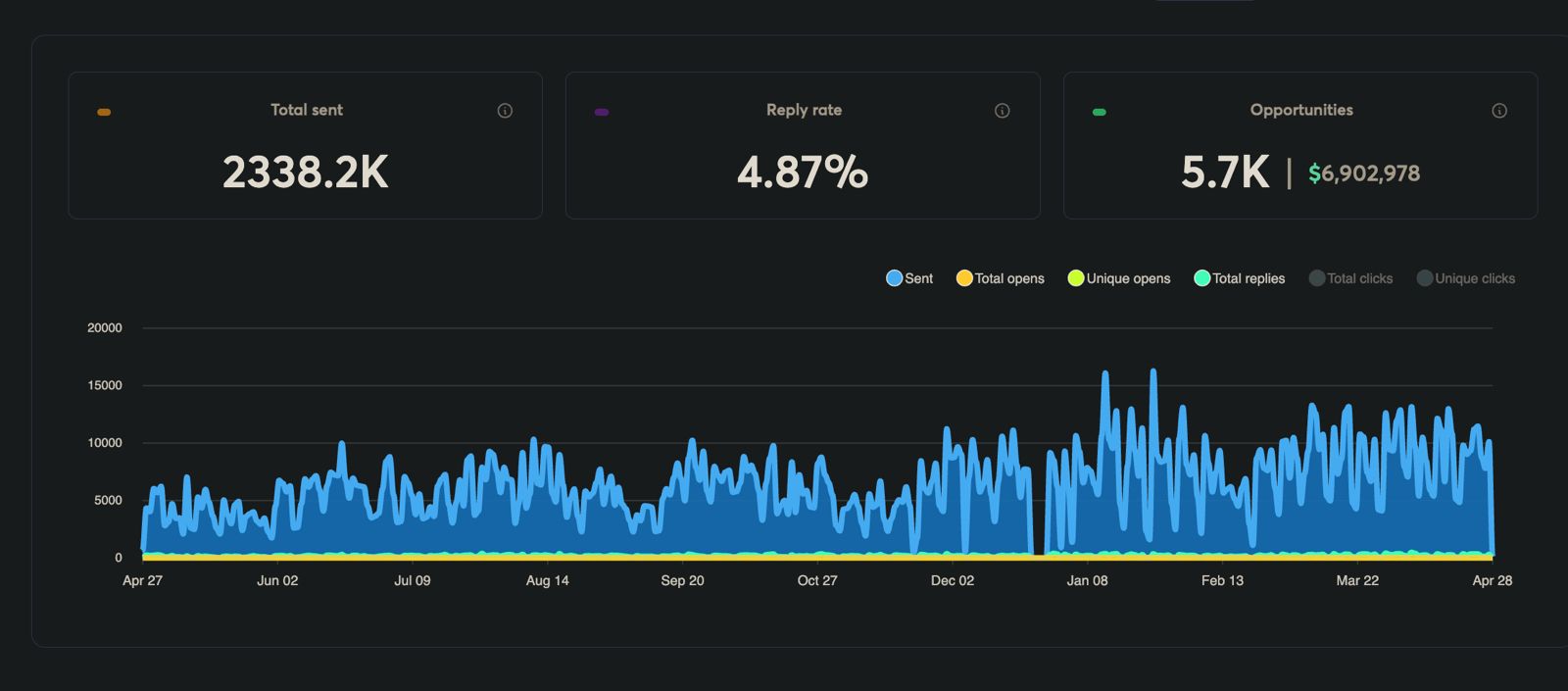
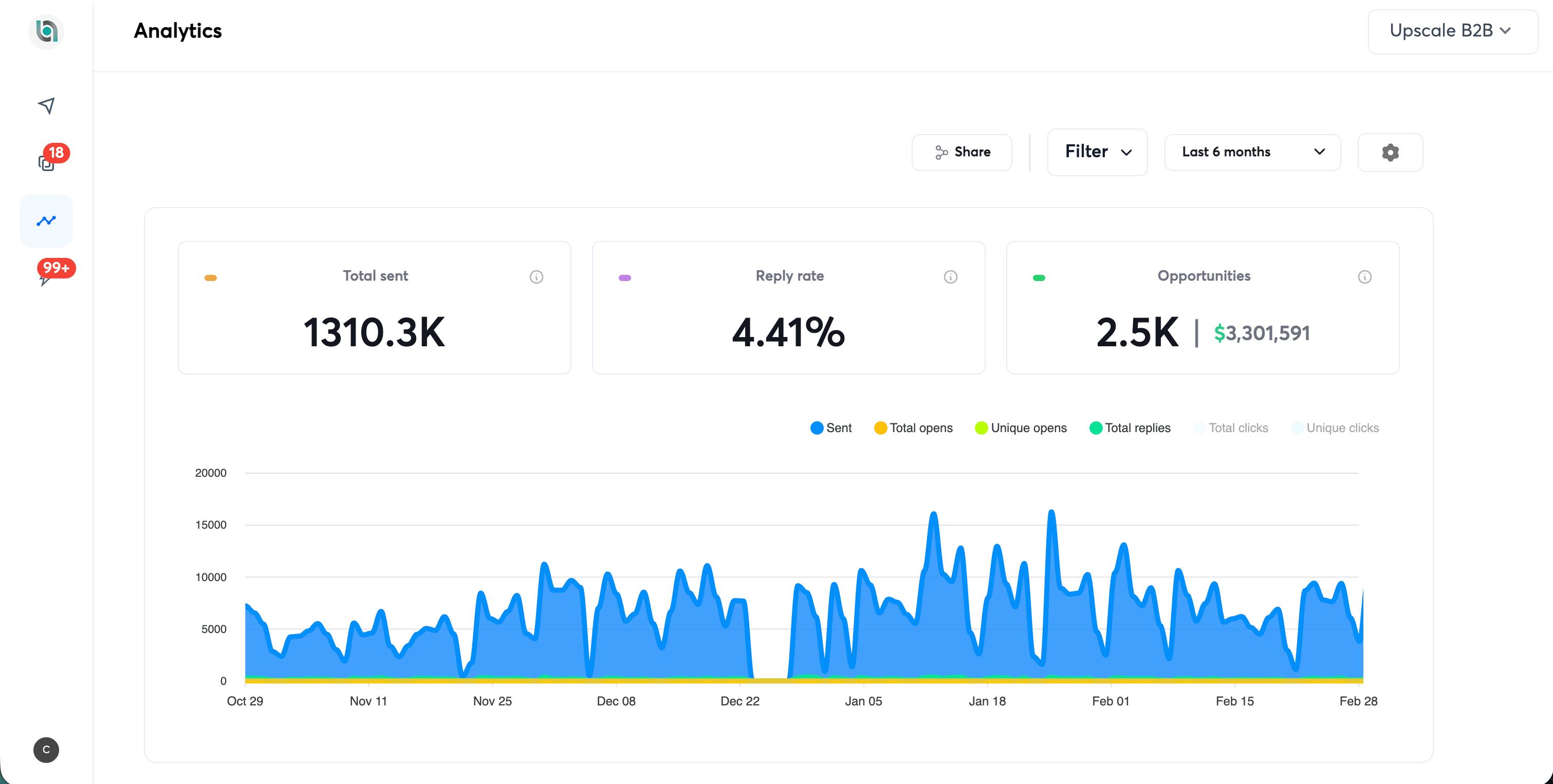
Real sequencer screenshots from campaigns running the exact playbook below.
In this playbook
- 1.The new inboxing reality
- 2.The 2026 inboxing model, five pillars
- 3.Infrastructure diversity: the core upgrade for 2026
- 4.The infrastructure rule: 3x classic, 2x with Warm Inboxes
- 5.Domains: keep them clean, separate, and replaceable
- 6.Copy is infrastructure
- 7.Sender identity and signature hygiene
- 8.Routing by recipient type
- 9.Placement testing before scaling
- 10.Monitoring: stop worshipping opens
- 11.Suppression lists
- 12.The clean 2026 inboxing checklist
- 13.Quick wins and key takeaways
- 14.Resources
1. The New Inboxing Reality
For years, the default cold email playbook was simple: buy domains, set up inboxes, warm them, send low volume, scale slowly.
That still matters, but it is no longer enough.
Mailbox providers are better at clustering patterns. They do not only look at whether one inbox is "warmed." They look at the full footprint:
This is why two operators can use the same sequencer and same sending volume but get completely different results. One is running a diversified system. The other is running a fragile one.
The fragile setup usually looks like this:
- All inboxes on one provider
- Similar domains with repeated sender names
- Same offer and copy structure across the board
- No routing logic by recipient type
- No real monitoring beyond open rates
- No standby pool ready when mailboxes decline
That setup might work for a while. Then one provider, one copy fingerprint, or one domain cluster gets hit, and the whole system starts falling over.
The better model: assume every asset has a lifespan and design around rotation before you need it.
2. The 2026 Inboxing Model
Inboxing is no longer a single checklist. It is an operating model built on five pillars.
Pillar 1: Infrastructure Diversity
You do not want your entire outbound motion dependent on one mailbox ecosystem. A Google-only setup can work for certain segments, but it creates a routing and reputation bottleneck. A better setup blends mailbox environments: Google inboxes for SMB and startup audiences, Azure / Microsoft inboxes for Microsoft-heavy and corporate audiences, and additional infrastructure when enterprise gateway routing requires it.
Pillar 2: Domain and Inbox Architecture
Domains and inboxes are units of risk. Treat them that way. Do not overload one domain. Do not rely on one registrar account. Do not wait until an inbox is dead before replacing it. Your infrastructure should always have active inboxes sending now, fresh inboxes warming for the next rotation, and cooling or standby inboxes ready to swap in.
See also: Cold Email Volume Calculator →
Pillar 3: Copy and Fingerprint Control
Most senders over-focus on infrastructure and under-focus on copy fatigue. In 2026, copy is infrastructure. Mailbox providers can cluster patterns across campaigns. If the same copy structure gets blasted across thousands of sends, new domains will not magically reset the risk. You need structural variation, not just spintax.
See also: Cold Email AI →
Pillar 4: Routing by Recipient Type
Not all recipients should be treated the same. A personal Gmail address, a Google Workspace business inbox, a Microsoft business inbox, and a company behind Proofpoint or Mimecast do not behave the same. The more volume you run, the more routing matters.
See also: The SPAM Plague Playbook →
Pillar 5: Testing, Monitoring, and Rotation
The inboxing operator does not wait for a campaign to collapse. They test before scaling, watch reply-rate movement, rotate copy before it burns, and swap infrastructure before the whole pool gets contaminated.
See also: Free Deliverability Tools →
3. Infrastructure Diversity: The Core Upgrade for 2026
The biggest infrastructure mistake is building a setup that only works when one provider behaves perfectly.
Think of infrastructure diversity as insurance against three risks:
Provider risk
If one mailbox provider starts underperforming for a segment, you are not fully exposed.
Routing risk
Some recipient environments respond better to Google; others respond better to Microsoft / Azure. Enterprise-heavy lists often need more careful routing.
Reputation concentration risk
When every send runs through the same type of mailbox, the same patterns build up in the same place.
The Simple Provider Split
| Audience Type | Better Starting Route |
|---|---|
| SMBs using Google Workspace | Google inboxes |
| Startups and agencies | Google or mixed Google / Azure |
| Corporate and Microsoft-heavy companies | Azure / Microsoft inboxes |
| Enterprise domains behind security gateways | Microsoft / Azure or dedicated SMTP |
| Personal Gmail leads | Lower volume, separate tracking, faster rotation |
Where Warm Inboxes Fits
Warm Inboxes offers both prewarmed and fresh Google and Microsoft inboxes, diversified across both providers, plus free .COM domains. Use it when:
- You need to launch immediately with prewarmed inboxes
- You want both Google and Microsoft coverage without managing two separate vendors
- You burned infrastructure and need a cleaner pool deployed fast
- You want to control the warmup process yourself with fresh fresh inboxes
- You want new .COM domains and inboxes handled together
The key is not just buying more inboxes. The key is buying the right mix of inboxes.
4. The Infrastructure Rule: 3x Classic, 2x With Warm Inboxes
A healthy outbound system should not run at the edge of its capacity. The classic rule says if you need 100 inboxes actively sending, you should own three times that:
1x
Active sending
1x
Warming up next
1x
Cooling, resting, or replacing
That third X exists for one reason: insurance. It is idle capacity you pay for so a burn never stalls your pipeline. Which means if the insurance exists somewhere else, you do not have to own it.
The Warm Inboxes upgrade: 2x rotation with a prewarmed backup
Because same-day prewarmed deployments exist, you can safely run 2x instead of 3x. Two batches, alternating: Batch A sends while Batch B rests and warms, then Batch B sends while Batch A rests. The third X is replaced by prewarmed inboxes on standby, one message away when something burns.
This is a lot safer and a lot less stressful than the alternatives. No batch ever accumulates fatigue, no burn ever stalls the campaign, and you carry a third less idle infrastructure while sleeping better than the operators running everything flat out.
The 2x rotation cycle
Why the 2-week cadence fits perfectly
Most campaigns only send to a given recipient for about 10 days anyway. And through extensive testing across our own volume, 2-email sequences consistently beat 3, 4, and 5-touch sequences: they say what they need to say, stay out of the spam folder, and never train a prospect to tune you out. A tight 2-email sequence wraps inside the 2-week window, so the batch swap lines up with the natural end of the campaign instead of interrupting it. Bonus: the resting batch becomes your second pass at the same list from a different sender a few weeks later.
Never discard inboxes. Ever.
Discarding inboxes is one of the worst mistakes a cold emailer can make. Replies do not stop when the sequence does: we have closed six-figure deals off replies that arrived three months after the original cold email went out. A prospect clears their backlog, a forward finally reaches the decision maker, a budget unfreezes. Delete the inbox and every one of those late replies bounces, leads you already paid to generate, gone. Resting inboxes cost almost nothing, keep their warmup reputation, and quietly catch the most profitable replies you will ever get.
Build your rotation schedule in 30 seconds
Enter your daily volume and inbox count, and the free Inbox Rotation Planner splits your fleet into two batches with the full alternating schedule, sized to our recommended pace of about 15 sends per inbox per day.
Open the Inbox Rotation Planner →Operator note
Do not rotate infrastructure while keeping burned copy. New inboxes with the same burned copy burn quickly. Rotate both clocks: infrastructure and copy.
5. Domains: Keep Them Clean, Separate, and Replaceable
Domains are reputation containers, not just addresses. A good domain system is easy to monitor, easy to replace, and hard to wipe out in one mistake. The rules below are not aesthetic. Our SURBL study found domains registered in a batch get grouped and listed on the word they have in common, so two domains that share a token share a fate — and our study of top-level domains by sends found the TLD alone predicts Google's permanent domain verdict, with .link drawing it 16 times more often than .com on the same copy to the same list.
Domain Naming Rules
Avoid
- Hyphens, numbers, obvious throwaway patterns
- Weird TLDs that look cheap or spammy
- Exact lookalikes that feel deceptive
Prefer
- .COM when possible, free .COM domains with every inbox order
- Clean two-word, brandable names
- Names that look like real businesses, not disposable sending shells
Registrar Risk
Do not concentrate too many domains in one registrar account. One issue should not wipe out your entire infrastructure base. Each registrar account is a unit of risk, same as each inbox.
Domain Forwarding at Scale, and the 2025 SURBL Panic
For large domain pools (300+), forwarding patterns become part of your infrastructure fingerprint. Many sending domains, one destination, same audience, same offer: that is the footprint you want to reduce. Mass forwarding is also what caused the SURBL hysteria of 2025, when hundreds of cold email domains redirecting to a single site got the whole pattern flagged at once.
What the panic got wrong: extensive testing on our side shows a SURBL listing does not, by itself, hurt inbox placement. Campaigns kept delivering while listed. So the listing is not the thing to be frightened of.
What it got right: being listed en masse is a different problem. It drags your primary brand domain in with the sending pool and gets your links flagged wherever they appear, including in mail you send from elsewhere. The damage is to the brand domain and the URLs, not to the sending domains’ placement.
The better pattern: stop redirecting and give each sending domain a real page. A static, no-index landing page per domain removes the many-to-one redirect entirely, so there is no forwarding pattern left to fingerprint and nothing pointing every domain at your brand. Claude Code and Cloudflare Pages will generate and host these for a whole pool in an afternoon.
Rule: small pool, forwarding is acceptable. Large pool, give every domain its own no-index page instead.
The new Warm Inboxes app generates these pages for your domains free, so you do not have to build the pipeline yourself.
Domain-Level Diagnosis
When one inbox on a domain starts landing in spam, do not assume the issue is isolated. Domain reputation is shared. If the domain is burned, trying to save individual inboxes is usually wasted effort.
6. Copy Is Infrastructure
Most campaigns do not die because the infrastructure was bad. They die because the same copy structure gets sent too many times.
Mailbox providers can detect patterns in opening line structure, sentence rhythm, CTA format, subject lines, signature layout, offer phrasing, and link behavior. Changing "Hi" to "Hey" is not enough. You need structural variation.
The 5-Variant Rule
For every core offer, create at least five structurally different versions of the email. That means changing:
Prompt to use
"Create 5 structurally different cold email variations. Keep the offer the same, but change the opening hook, sentence structure, CTA style, length, and phrasing. Make each version feel like a different human wrote it."
Subject Line Pool
Subject lines are easy to fingerprint because they are short. Use a pool of 20+ subject lines. All lowercase, maximum two words, no spam-trigger language.
7. Sender Identity and Signature Hygiene
Your sender identity is part of your footprint. If you use the same name, title, signature, and footer across hundreds of inboxes, you create a pattern that is easy to group.
Sender Name Rule
Use one unique sender name per mailbox. Do not run 500 inboxes across 15 names. One first/last name per mailbox, natural titles rotated across the pool, signature formatting lightly varied.
Signature, Avoid
- Hyperlinked company names or website URLs
- Tracking links
- Identical formatting across every inbox
- Overdesigned HTML signatures
Signature, Use
- Plain-text name, role, and brand name
- Optional phone number only where it makes sense
- Light variation in formatting across the pool
8. Routing by Recipient Type
Our own seed tests make this case harder than we can: in the placement log, Google into Google never dropped below 93.83% across seven months, while Microsoft into Google fell to 0.22% and came back. Run your list through the free ESP segmenter to see which lanes you actually need.
Google Workspace Recipients
Google inboxes are a good match for Google Workspace-heavy audiences: SMBs, agencies, startups, and service businesses. Monitor reply rates by recipient environment. A Google-to-Google decline may be provider-specific, not a campaign-wide failure.
Microsoft and Azure Recipients
For Microsoft-heavy audiences, Azure / Microsoft inboxes give you a cleaner lane. This is why having Azure inboxes in your mix matters, it avoids forcing every corporate lead through Google infrastructure.
Enterprise Gateways
Run MX checks on recipient domains. Segment by provider or gateway. Route Google-friendly segments through Google inboxes, route Microsoft-heavy segments through Azure / Microsoft. Watch bounce patterns by sender provider. If enterprise gateway bounces cluster heavily around Google sends, that is a routing problem, not necessarily a copy problem.
Personal Gmail and Consumer Domains
Personal Gmail behaves differently than Google Workspace. Expect shorter mailbox lifespan and weaker placement visibility. Consumer domains like Outlook, Hotmail, Yahoo, iCloud, and AOL are tuned for consumer protection, be careful.
Which sender each ESP bucket should use
Splitting the list is half the job. The other half is matching each bucket to the right sending infrastructure, because the same email performs very differently depending on which provider it leaves from and which one it lands on.
Google ESP recipients → Google Workspace
Our best-performing route. Sending from Google Workspace to Google-hosted recipients is where we see the strongest performance, double-digit reply rates and most booked calls. Use for highest-fit leads and priority verticals.
Other ESP recipients → Azure
Not a cost compromise: into non-Google, non-Microsoft recipients Azure out-replies Google in our own campaigns, 2.16% against 1.67%. It is cheaper as well, so the same decision preserves Google capacity for the Google bucket where it actually earns its price.
Azure inboxes run about $0.50 each through Warm Inboxes against roughly $3 for Google, prewarmed and ready to send, so the Other bucket costs a fraction of what the Google bucket does.
Microsoft ESP recipients → Age matters most
Use minimum 3-month-old domains. Ideally 1-year-old+ domains. Aged domains are available through Warm Inboxes on request.
Route 1: Google → Microsoft
Often the strongest long-term route. Avoids compounding filtering when both sides are heavily Microsoft-filtered.
Route 2: Microsoft / Azure → Microsoft
Can work with aged domains and careful pacing. Do not use brand-new throwaway domains for this. Spam reports compound faster on Microsoft-to-Microsoft.
What our own routing tests show
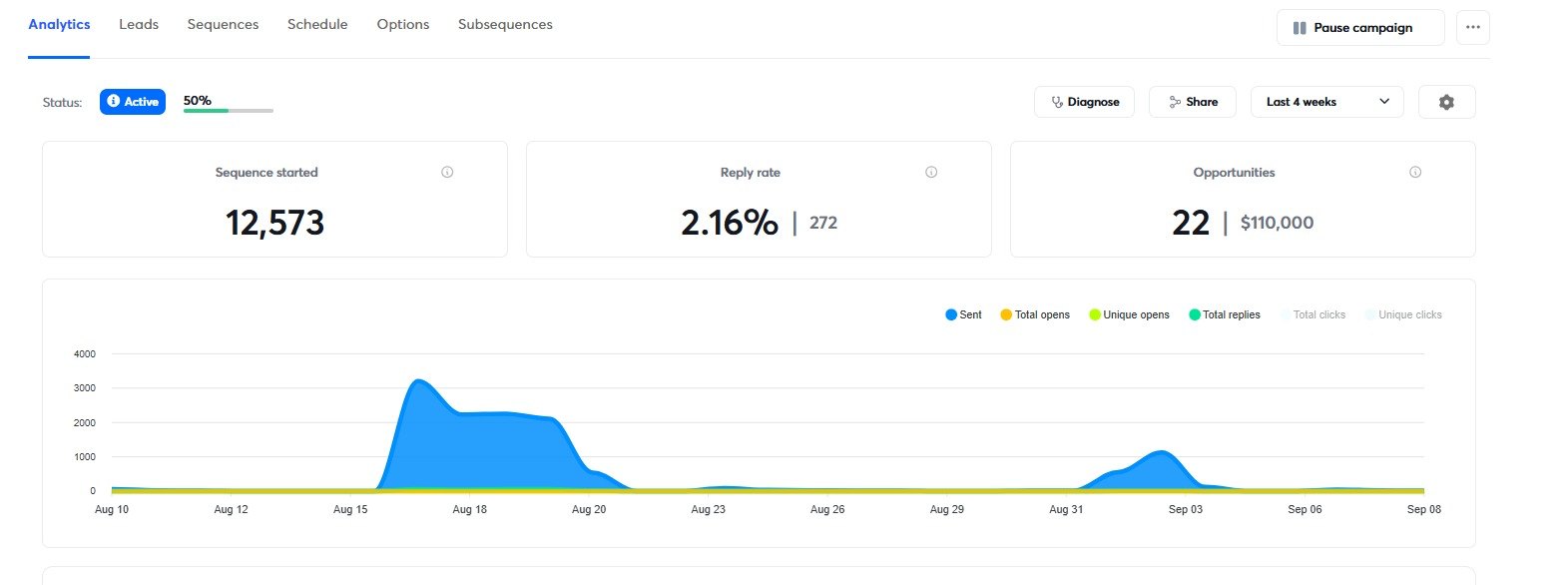
Same offer, same list source, one thing changed: which inbox sent to which kind of recipient. These are our own campaigns, not a vendor benchmark — and they ran at different times rather than side by side, so read the gaps below as consistent and large rather than as a controlled test. The dashboards are printed underneath with their dates on them.
| Sender → Recipient | Sends | Replies | Reply rate | Opportunities |
|---|---|---|---|---|
| Google → Google | 8,760 | 518 | 5.91% | 15 · $14,955 |
| Azure → Other | 12,573 | 272 | 2.16% | 22 · $110,000 |
| Google → Other | 7,134 | 119 | 1.67% | 2 · $1,994 |
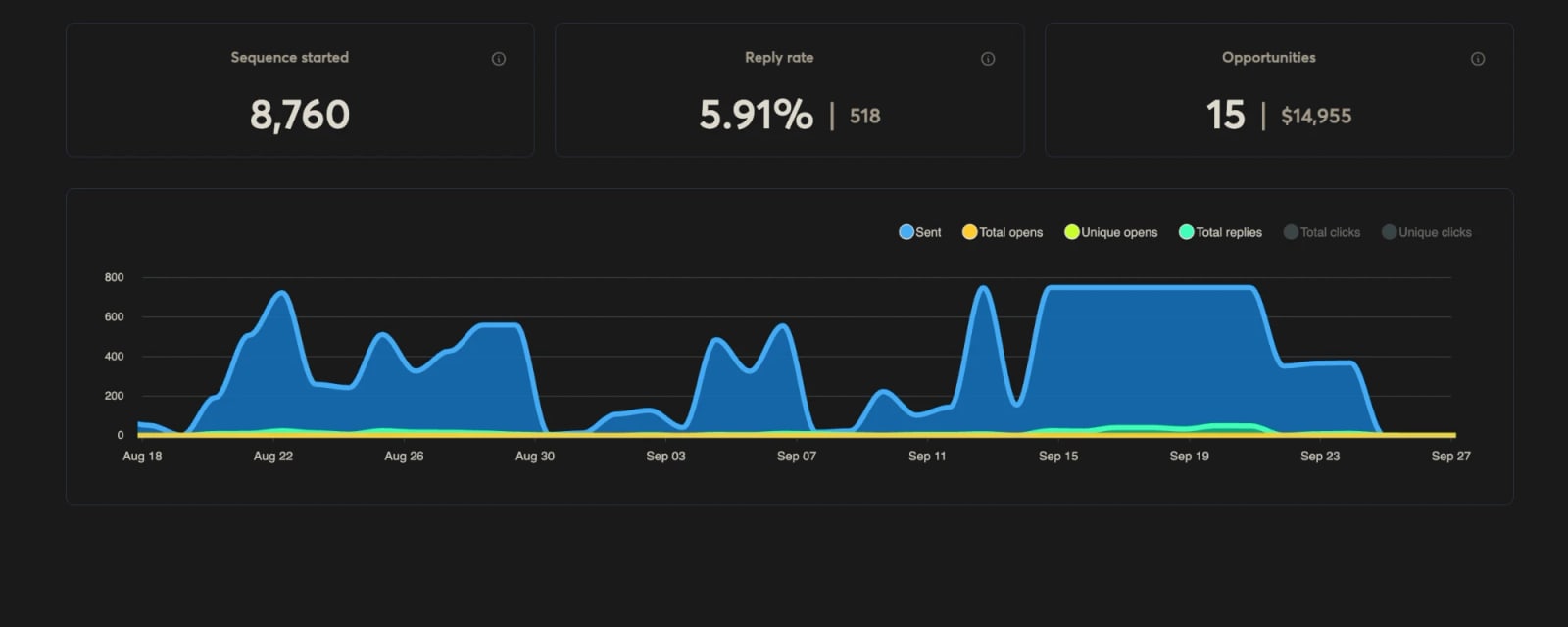
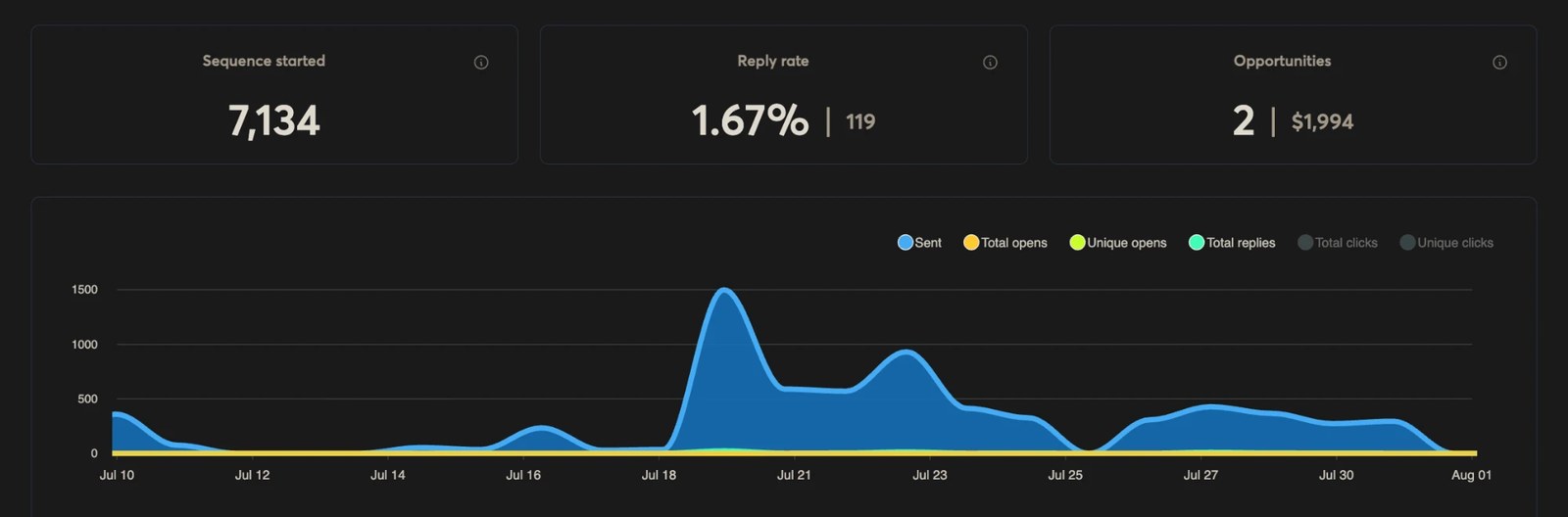
Google into Google is the strongest route we have. At 5.91% it runs nearly three times Azure into Other and about three and a half times Google into Other. This is where your best-fit leads belong.
Into everything else, Azure beats Google. 2.16% against 1.67% off the same offer, about 29% better. The fourth combination, Azure into Google recipients, is the weakest in our data, which is why the allocation table never recommends it.
So the finding is not “Google inboxes always win”. Google inboxes win into Google. Spend them there, and let Azure carry everything else.
The rule this produces
Google recipients from Google inboxes. Everyone else from Azure. Applied across a mixed book at our current recipient split, that moves reply rate from 0.65% to about 1.22%.
9. Placement Testing Before Scaling
Do not wait until volume is live to learn whether your campaign is landing. This is what we do to our own stock every month, and we publish the results: the inbox placement log is seven tests on seven batches, screenshots included, with the bad months in it.
Simple Manual Test
Use at least one Google Workspace seed inbox and one Microsoft seed inbox. Duplicate the sequence, send from the mailbox batch you plan to use, check inbox vs spam manually, and fix issues before increasing volume.
Domain-Level Testing
Test by domain, not only by mailbox. If one inbox on a domain is landing in spam, the domain may be affected. Do not diagnose every inbox as a separate universe.
Free checks before you spend volume
10. Monitoring: Stop Worshipping Opens
Open tracking is not a reliable source of truth. Open pixels can hurt deliverability, and privacy features create false opens. The cleaner KPI is reply rate.
Track reply rate by:
The questions the best operators ask:
- Are Google inboxes declining faster than Azure inboxes?
- Are Microsoft recipients replying better from Azure senders?
- Is one copy variant burning faster than the others?
- Did one domain batch drop before the rest?
- Are bounces clustering around enterprise gateways?
The Pre-Burn Window
If reply rate drops more than 25% week-over-week while ICP, offer, and volume stay stable, pause. Rotate copy. Check placement. Inspect bounces. Review domain health. Waiting too long turns a fixable copy issue into a full infrastructure rebuild.
Four free tools cover that list: the header analyzer for what the receiver actually decided, the bounce analyzer for why mail came back, the blacklist checker for domain health across twenty lists, and the spam checker for the copy itself.
11. Suppression Lists: The Compounding Deliverability Asset
A suppression list is not admin work. It is infrastructure protection.
Suppress:
- Hard bounces and recent bounces
- Unsubscribes and spam complaints
- Dead catch-all addresses
- Non-engagers that repeatedly absorb sends without replies
Apply suppression globally, not only inside one campaign. Every campaign should make the next campaign cleaner. Without a global suppression list, your team keeps rediscovering the same bad leads and burning fresh inboxes on old mistakes.
The free suppression checker diffs a send list against your suppression file before you launch, and the bounce analyzer tells you which bounces belong on it in the first place.
12. The Clean 2026 Inboxing Checklist
Use this before launching any serious outbound campaign.
Infrastructure
- Google and Azure / Microsoft inboxes are both available
- Domains are clean, believable, and .COM where possible
- Active, warming, and standby inbox capacity exists
- Not relying on one provider for every recipient type
- Domain forwarding avoided at 300+ domain scale
DNS and Setup
- SPF configured, check it
- DKIM configured
- DMARC configured, check it
- DNS records clean, check it
- Domains not blacklisted, check it
- Domains not close to expiry, check it
Copy
- At least 5 structural variants exist
- Subject line pool has 20+ options
- Spintax applied only after structural variation
- Burned copy not touching new infrastructure
Sender Identity
- One sender name per mailbox
- Signature is plain text
- No signature URLs
- Titles and formatting lightly varied across the pool
Routing
- Google-heavy recipients routed through Google
- Microsoft-heavy recipients routed through Azure / Microsoft
- Enterprise gateway domains segmented
- Personal Gmail and consumer domains treated separately
Tracking and Monitoring
- Open tracking off
- Click tracking off unless absolutely necessary
- Reply rate tracked by cohort
- Bounces reviewed by recipient provider
- Placement tested before scaling, run a check
Rotation
- Two batches alternating: one sending, one resting and warming
- Inboxes rotating before they burn
- Copy rotating with infrastructure
- Suppression list updated after every campaign
- Prewarmed deployments available for same-day recovery
- Resting inboxes kept alive, never discarded, late replies keep landing
13. Quick Wins / Key Takeaways
Inboxing in 2026 is controlled diversity.
The biggest mistakes are usually concentration mistakes: one provider, one copy angle, one sender identity pattern, one domain pool, one route for every lead, one metric.
The simple upgrade path:
Add infrastructure diversity, get prewarmed or fresh Google and Microsoft inboxes live across both providers
Run 2x inbox capacity in a two-batch rotation, with prewarmed deployments as your standby insurance, plan it with the Inbox Rotation Planner
Create structural copy variation before scaling, use Cold Email AI
Route recipients by mailbox environment and gateway type
Track reply rate by cohort, not just campaign-wide performance
Use suppression lists so every campaign makes the next one cleaner
Never move burned copy onto fresh infrastructure
14. Resources
Warm Inboxes
Prewarmed and fresh Google and Microsoft inboxes with free .COM domains.
Cold Email AI
Structural copy variation, turn one working angle into multiple structurally different versions.
Inbox Rotation Planner
Split your fleet into two alternating batches with a full schedule, free.
Volume Calculator
Size your inbox and domain needs before you start.
Deliverability Playbooks
Tactical launch, scale, and repair guides.
Deliverability Consultation
Diagnose what is actually breaking.
Wall of Love
Reviews from operators using Warm Inboxes.
Free Deliverability Tools
Next Step
If you are building cold email infrastructure for 2026, do not build a single-lane setup.
Start with provider diversity. Get Google and Azure inboxes live, keep standby capacity warming, and route campaigns based on the recipient environment instead of forcing every lead through the same lane.
Prewarmed & Fresh Inboxes
Google, Microsoft 365 and Azure inboxes with free prewarmed domains and DNS configured before you log in. Prewarmed inboxes send the day they land; every order is delivered within 48 to 72 hours.
Get Prewarmed & Fresh Inboxes