Home › Deliverability Hub › Playbooks › The SPAM Plague

How to Avoid the SPAM Plague in 2026
The Complete List Verification, ESP, ESG & Role Segmentation Playbook
A field-tested cold email segmentation system for cleaner lists, better inbox routing, sharper persona-based copy, and higher reply rates before you ever launch.
"Most cold email campaigns do not fail because of copy. They fail because the list was never segmented properly before the first send."
In this playbook
- 1.Why cold email campaigns fail before copy matters
- 2.The 4-layer segmentation model
- 3.Layer 1: Email verification segmentation
- 4.Layer 2: ESP segmentation
- 5.Layer 3: ESG / SEG segmentation
- 6.Layer 4: Role-based copy segmentation
- 7.C-suite copy angles by persona
- 8.Internal-reference campaigns
- 9.Inbox allocation by ESP and risk level
- 10.Campaign naming map
- 11.Quick wins and pre-send checklist
- 12.Warm Inboxes resources and next steps
Why Cold Email Campaigns Fail Before Copy Matters
At our agency, we scrape, enrich, and verify roughly 2 million leads every month.
The biggest lesson from that volume is simple: most cold email campaigns do not fail because of copy. They fail because the list was never segmented properly before the first send.
Verification and segmentation are two of the core pillars of a successful cold email campaign. If you skip them, you end up mixing clean leads with risky leads, Google recipients with Microsoft recipients, easy inboxes with heavily protected enterprise inboxes, and dream accounts with contacts that should have been emailed last, or not at all.
It is also where the money is. Our SURBL study measured every cause of lost delivery across 2.9 million sends on the same scale: invalid addresses in prospect lists cost roughly sixteen times what every blocklist listing in the fleet cost put together. Cleaning the list is not housekeeping before the real work — it is the largest single lever there is.
This playbook breaks down the full segmentation system we use before launching campaigns at scale. The goal is not just to "clean a list." The goal is to know exactly:
- Who is safe to email first
- Who needs a separate campaign
- Who needs double verification
- Who should be routed by ESP
- Who is protected by an email security gateway
- Which inboxes should send to which recipients
- Which leads should be hit last, slowly, and with your best offer
- Which role-specific angle will make each decision-maker care
The 4-Layer Segmentation Model
Most people stop after basic email verification. That is the mistake.
A proper 2026 cold email list should be segmented in four layers:
Layer 1: Verification Status
Whether the email is safe, risky, unknown, invalid, role-based, spam trap, or catch-all.
Layer 2: ESP Type
Whether the recipient is on Google, Microsoft, or another provider.
Layer 3: ESG / SEG Protection
Whether the recipient is sitting behind a security gateway or filtering layer that makes delivery harder.
Layer 4: Role / Persona
The decision-maker's function, incentives, language, and buying lens, CEO, CMO, CRO, BD, CFO.
When you combine all four, you stop treating your list like one giant CSV and start treating it like an actual sending system.
Layer 1: Email Verification Segmentation
No list yet? Export whichever one you want free from the Free Leads Database, 700+ lists across every industry, then start here. Run the full list through a bulk verifier such as Reoon, Bulk Verify, or your preferred first-pass tool — our free email verifier and CSV list cleaner do the first pass in the browser if you want to start without an account. Your goal is not perfection, it is to quickly split the list into clear buckets.
All verified safe emails. Your cleanest pool. Prioritize these first. Sub-split by ESP later.
Catch-all emails are uncertain, not automatically bad. Keep separate, they often contain role addresses like support@, info@, contact@.
Do not throw unknowns away, double verify with ZeroBounce or MillionVerifier first. Only send to ones that pass the second layer.
Known invalids, spam traps, disposable emails, and toxic records. Remove them. Your domain reputation is worth more than a few extra rows.
Layer 2: ESP Segmentation
Once verification buckets are set, split every campaign by the recipient's email provider. Most serious sequencers show you this data. If yours does not, use a bulk MX discovery tool.
Google ESP
Gmail, Google Workspace
Microsoft ESP
Outlook, Microsoft 365
Other ESPs
Zoho, Yahoo, private servers
| Verification Bucket | Microsoft | Other | |
|---|---|---|---|
| Safe | Safe, Google | Safe, Microsoft | Safe, Other |
| Catch-All / Support | Catch-All, Google | Catch-All, Microsoft | Catch-All, Other |
| Unknown Reverified | Unknown, Google | Unknown, Microsoft | Unknown, Other |
This gives you 9 core campaigns before ESG/SEG filtering. Most people run 1. Better operators get to 9, then the real segmentation starts.
Do this layer in one paste
The free ESP Segmenter runs the MX lookup for you: paste or upload a list and it splits every address into the Google, Microsoft and Other buckets above, then tells you how many inboxes of each type to buy for the mix you actually have.
Run your list through the ESP Segmenter →Which sender each ESP bucket should use
Splitting the list is half the job. The other half is matching each bucket to the right sending infrastructure, because the same email performs very differently depending on which provider it leaves from and which one it lands on.
Google ESP recipients → Google Workspace
Our best-performing route. Sending from Google Workspace to Google-hosted recipients is where we see the strongest performance, double-digit reply rates and most booked calls. Use for highest-fit leads and priority verticals.
Other ESP recipients → Azure
Not a cost compromise: into non-Google, non-Microsoft recipients Azure out-replies Google in our own campaigns, 2.16% against 1.67%. It is cheaper as well, so the same decision preserves Google capacity for the Google bucket where it actually earns its price.
Azure inboxes run about $0.50 each through Warm Inboxes against roughly $3 for Google, prewarmed and ready to send, so the Other bucket costs a fraction of what the Google bucket does.
Microsoft ESP recipients → Age matters most
Use minimum 3-month-old domains. Ideally 1-year-old+ domains. Aged domains are available through Warm Inboxes on request.
Route 1: Google → Microsoft
Often the strongest long-term route. Avoids compounding filtering when both sides are heavily Microsoft-filtered.
Route 2: Microsoft / Azure → Microsoft
Can work with aged domains and careful pacing. Do not use brand-new throwaway domains for this. Spam reports compound faster on Microsoft-to-Microsoft.
What our own routing tests show
Same offer, same list source, one thing changed: which inbox sent to which kind of recipient. These are our own campaigns, not a vendor benchmark — and they ran at different times rather than side by side, so read the gaps below as consistent and large rather than as a controlled test. The dashboards are printed underneath with their dates on them.
| Sender → Recipient | Sends | Replies | Reply rate | Opportunities |
|---|---|---|---|---|
| Google → Google | 8,760 | 518 | 5.91% | 15 · $14,955 |
| Azure → Other | 12,573 | 272 | 2.16% | 22 · $110,000 |
| Google → Other | 7,134 | 119 | 1.67% | 2 · $1,994 |
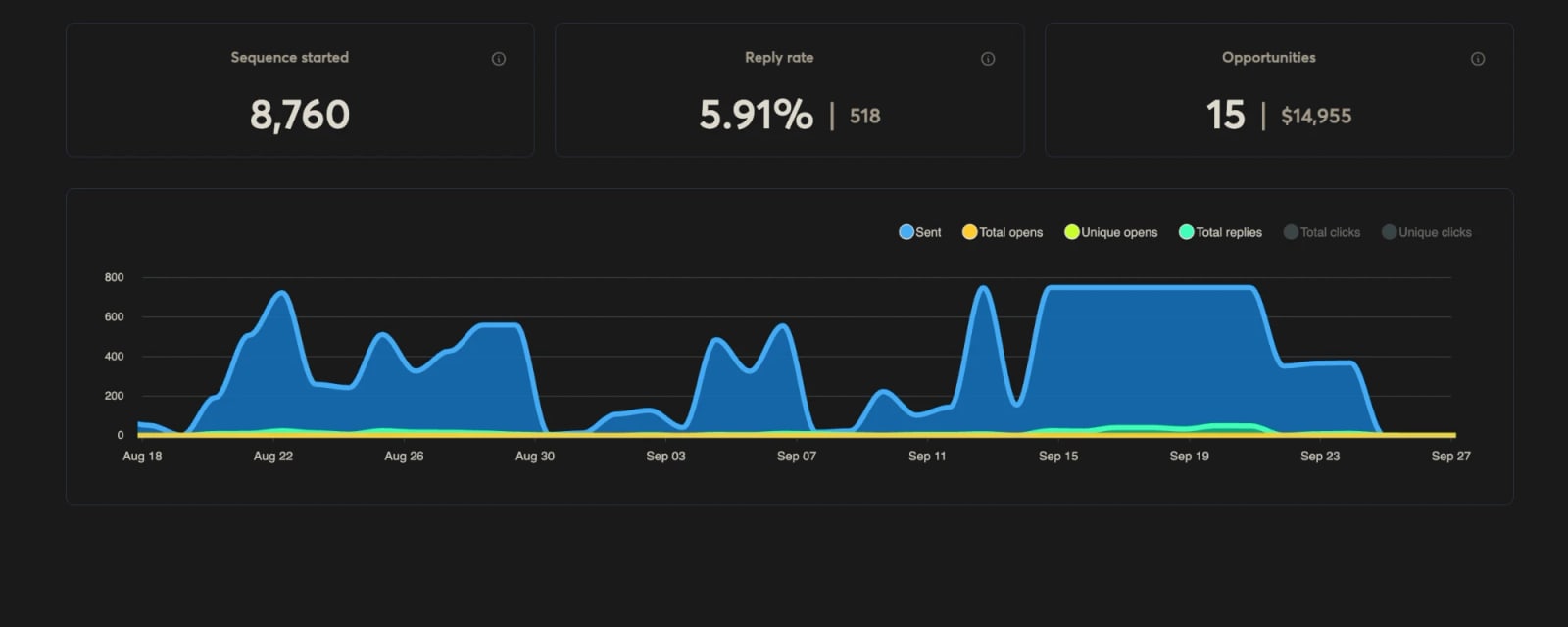
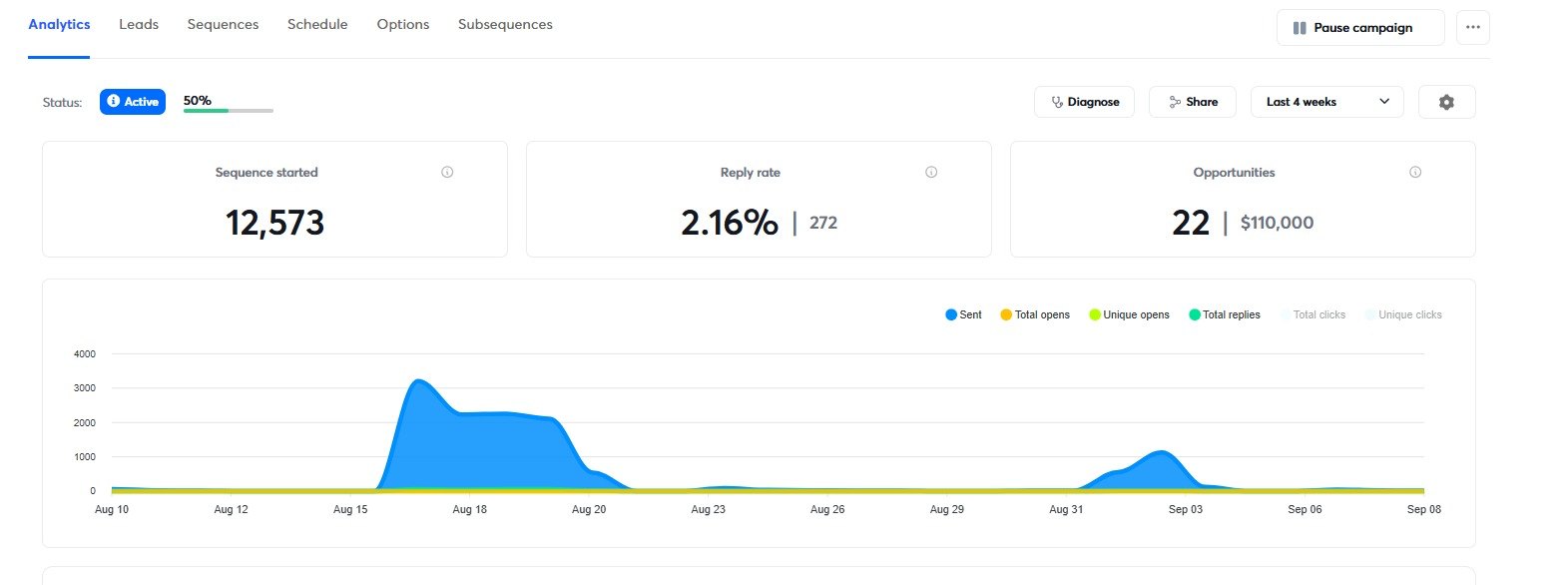
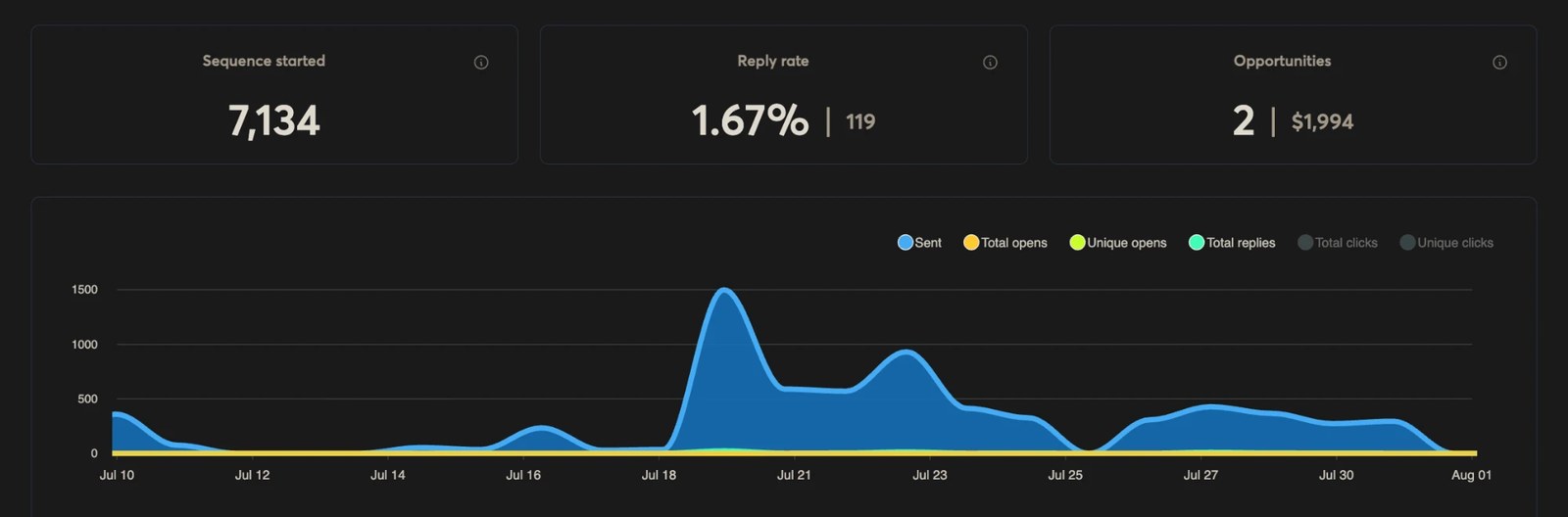
Google into Google is the strongest route we have. At 5.91% it runs nearly three times Azure into Other and about three and a half times Google into Other. This is where your best-fit leads belong.
Into everything else, Azure beats Google. 2.16% against 1.67% off the same offer, about 29% better. The fourth combination, Azure into Google recipients, is the weakest in our data, which is why the allocation table never recommends it.
So the finding is not “Google inboxes always win”. Google inboxes win into Google. Spend them there, and let Azure carry everything else.
The rule this produces
Google recipients from Google inboxes. Everyone else from Azure. Applied across a mixed book at our current recipient split, that moves reply rate from 0.65% to about 1.22%.
Inbox Allocation by ESP and Risk Level
Every segment in one table: ESP bucket and verification status combined into a single sending priority, so you can see the whole allocation at a glance rather than reasoning through it campaign by campaign. Get your own bucket sizes from the free ESP Segmenter.
The last three rows are risk tiers rather than ESP buckets. Layer 3 below covers what they are and how to label them.
| Recipient Segment | Recommended Sender | Priority |
|---|---|---|
| Safe Google | Google Workspace | High |
| Safe Other ESP | Azure | High |
| Safe Microsoft | Google or aged Microsoft/Azure | Medium/High |
| Catch-All Google | Google Workspace | Medium |
| Catch-All Microsoft | Aged Google or aged Microsoft | Medium/Low |
| Unknown Reverified | Match by ESP | Medium |
| Other ESGs | Old domains | Low |
| Proofpoint | Oldest domains / email last | Very Low |
| Mixmax | Email last / omnichannel | Very Low |
Operator note
Every ESP scores reputation separately. That is an opening.
A domain Google has stopped trusting is still an unknown to Azure. So when a domain burns on Google and stops delivering Google to Google, it is not scrap. Move it to Azure, warm it for 14 days, and it will hit Azure to Other recipients at reply rates worth having.
It runs the other way too. A domain burned on Azure can be repurposed to Google and go back to work on Google to Google, which is the strongest route in our data.
One live Google → Google campaign · Aug 18 – Sep 27, 2026
8,760
Emails sent
5.91%
518 replies
15
Opportunities
The caveat that decides whether this works is volume. If you were pushing more than about 150 cold emails a day at the domain or tenant level, assume the domain is burned as a whole rather than burned on one platform. Statistically that one is unlikely to perform on Google no matter what you reattach it to, and repurposing it will disappoint you.
Microsoft is its own case. Nothing under three months old survives there, so aged domains are not optional. What you can do is cycle the infrastructure underneath a domain as each life runs out: Google, then Azure, then SMTP.
Layer 3: ESG / SEG Segmentation
Email Security Gateways are one of the biggest hidden reasons campaigns underperform in 2026. A lead can be verified, enriched, perfectly targeted, on the right ESP, written with great copy, and still never really see your email.
What is a Secure Email Gateway?
A Secure Email Gateway (SEG) is a security layer between the company's email infrastructure and inbound/outbound traffic, built to defend against spam, phishing, malware, and other threats. Examples include Proofpoint, Mimecast, Barracuda, Cisco, and Mixmax-style cold email filtering.
No obvious SEG label. Send through normal ESP-matched campaigns. Prioritize before ESG-heavy leads.
Protected by security tools. Send more carefully, lower daily volume, slower ramp, fewer links, cleaner copy, more personalization.
Proofpoint, Mixmax Cold Email Shield, heavily protected enterprise domains. Only use your oldest domains, lowest volume, and strongest offer here.
Operator Note
In our campaigns, Mixmax Cold Email Shield and Proofpoint are treated as "email last" unless the account is genuinely worth the extra effort. Mixmax can reclassify a message as cold outreach and move it out of the main inbox, senders cannot turn this off. Proofpoint maintains Dynamic Reputation systems that can delay or block IPs flagged as suspicious.
The Extra Lives Secret: Burn Order
A domain that gets burned or banned on a Google inbox is not dead. Reattach it to Azure, warm it for 14 days, and it sends again, and when that life is spent too, route it through SMTP. Each sending platform scores your domain's reputation separately, so one domain has several lives depending on where you send it from. Layer 2's operator note above covers which swap to make and the volume that rules the trick out.
Recipients have an order too, and it runs the other way. Send to your SEG segment first, while the domain is at its freshest and strongest; when it burns against the gateways it still has a full life left for normal Google and Outlook recipients. Stack the two together, hardest recipients first, then Google to Azure to SMTP as each one burns, and a single domain works through everything it can reach instead of dying with lives unused.
Layer 4: Role-Based Segmentation
Role segmentation is message-market-role fit.
Once your list is verified, segmented by ESP, and filtered for ESG/SEG risk, there is one more layer that can massively improve performance: role-based segmentation.
Most teams write one cold email and send it to every decision-maker at the company. A CEO, CMO, CRO, BD leader, and CFO may all work at the same company, but they do not care about the same things. They have different incentives, measure different outcomes, and react to different offers. So they should not receive the same copy.
| Role | What They Care About |
|---|---|
| CEO / Founder | Growth, risk reduction, speed, strategic leverage |
| CMO | Campaign performance, attribution, brand risk, analytics |
| CRO / Head of Sales | Pipeline, booked meetings, rep productivity |
| Head of BD | New conversations, account access, partnerships |
| CFO | Cost, ROI, financial risk, waste reduction |
C-Suite Copy Angles by Persona
The same service can be positioned completely differently depending on the person reading it. Use these as a starting point for each role-based campaign.
CEO / Founder
They care about
- Growth & speed
- Risk reduction
- Strategic leverage
- Revenue outcomes
- Fewer moving parts
Copy angle
Outcome-heavy, risk reversal, speed-to-result, strategic framing
Avoid
Heavy jargon, technical details, long setup language
Example positioning
"Most outbound teams do not have a lead problem. They have an infrastructure and deliverability problem that quietly caps growth before the offer even gets tested."
CMO
They care about
- Campaign performance
- Channel efficiency
- Attribution
- Brand risk
- Qualified demand
Copy angle
Performance metrics, campaign diagnostics, analytics framing, brand-safe positioning
Avoid
Sounding too salesy, ignoring attribution and campaign learnings
Example positioning
"If inbox placement is broken, your campaign data lies. You may think the offer failed when the real issue was infrastructure, segmentation, or deliverability."
CRO / Head of Sales
They care about
- Pipeline
- Booked meetings
- Rep productivity
- Sales velocity
- Predictable deal flow
Copy angle
Pipeline language, booked meetings, sales efficiency, conversion bottleneck framing
Avoid
Fluffy brand language, too much technical deliverability talk without tying it to meetings
Example positioning
"Before changing the offer, make sure the right people are actually receiving the email. Most teams blame SDRs for problems caused by list quality and inbox placement."
Head of BD / Partnerships
They care about
- New conversations
- Account access
- Strategic relationships
- Opening doors
- Market expansion
Copy angle
Relationship language, account access framing, expansion angles, soft CTAs
Avoid
Aggressive demo language, overly automated copy, generic sales outreach
Example positioning
"Some accounts need more than one cold email. They need a clean account-based path into the right person, with the right context, from infrastructure that can actually reach them."
CFO
They care about
- Cost & efficiency
- Waste reduction
- ROI & margin
- Financial risk
- Lower CAC
Copy angle
Financial language, savings, risk reduction, cost-per-meeting, efficiency
Avoid
Hype, vague growth promises, over-indexing on creative/copy language
Example positioning
"Most outbound waste is invisible. The team pays for leads, inboxes, enrichment, copy, and SDR time, then sends from infrastructure that was never segmented properly."
Internal-Reference Campaigns
Another high-performing segmentation layer is creating campaigns that reference other people at the same company. In our agency workflows, these campaigns have produced roughly 6–20% reply rates on average when list quality, offer, sender reputation, and segmentation are strong.
This works because the message feels more contextual. Instead of sounding like a random cold email, it feels like you understand the company's structure and are trying to route the conversation properly.
It makes the email feel more researched, more account-aware, less spammy, and easier to forward.
Important Rule: Do not fake relationships.
Do not say "I was speaking with Sarah…" if you were not. Do not say "Your team asked me to reach out…" if they did not. That is how you burn trust. Use clean routing language instead.
Safe internal-reference phrases
- "Not sure if this sits with you or someone on your team…"
- "I saw [Name] leads [function], but figured this may also touch your side."
- "This may be more relevant for your growth/sales/marketing team."
- "I noticed a few people on your team are close to this function, so I wanted to route this properly."
- "If this is more relevant for [role/team], happy to send it there instead."
The "Not Sure Who Owns This" Campaign
Best for: Larger companies where ownership is unclear.
"Not sure if outbound infrastructure sits with you, sales ops, or growth, but I noticed something that may be worth checking before your team scales volume."
Why it works: It gives the prospect an easy reply path. Any reply is useful.
The "Saw Your Team Is Scaling" Campaign
Best for: When you see hiring, new SDRs, new markets, new funding, or visible GTM expansion.
"Saw your team has a few people tied to growth and outbound. Usually when that happens, infrastructure becomes the bottleneck before copy does."
Why it works: It connects your message to something happening inside the company.
The "Wrong Person, Right Company" Campaign
Best for: When you are unsure whether the contact owns the problem directly.
"May be the wrong person, but this usually matters to whoever owns outbound, pipeline, or sales ops. We help teams avoid burning domains by segmenting lists by verification status, ESP, ESG protection, and role before launch."
Why it works: It lowers the pressure and makes forwarding easy.
The "Reference the Function" Campaign
Best for: When you have multiple people at the same account.
"I saw a few people on the team tied to revenue, growth, and demand gen. The reason I'm reaching out is because outbound performance usually breaks when list quality, ESP routing, and inbox allocation are all treated as one generic campaign."
Why it works: You are referencing the company structure, not pretending to know someone.
The "Forwardable Asset" Campaign
Best for: When you have a useful audit, teardown, or checklist.
"I put together a quick checklist your sales/growth team can use to check whether your cold email campaigns are being filtered by Microsoft, Google, or ESG layers before replies drop."
Why it works: It gives the recipient something useful to forward internally.
The Microsoft Copy Rule
When emailing Microsoft-heavy segments, lead with insane value. This is not the place for generic "Quick question…" or "Do you have 15 minutes next week?" Use a Trojan offer instead, an offer so useful, relevant, or easy to accept that it does not feel like a pitch.
Trojan offer examples
- "I found 3 deliverability issues that may be suppressing your outbound."
- "I mapped 200 companies in your ICP using your current filters."
- "I recorded a 3-minute teardown of your current cold email infrastructure."
- "I found the exact reason your SPF/DMARC setup may be causing risk."
- "I made a quick list of accounts your team is likely missing."
The Searchable Subject Line Trick
Use a subject line your prospect is likely to search during normal inbox use. Even if your email lands outside the primary inbox, it may resurface when the prospect searches for related work.
Campaign Naming Map
Use clear names so your team knows exactly what each campaign is doing, and so you can isolate what's working when you run tests.
Verification-first campaigns
ESP segmented campaigns
ESG segmented campaigns
Role-segmented campaigns
Account-based / internal-reference campaigns
With role segmentation, you can now isolate performance changes caused by:
That is how you stop guessing.
Quick Wins & Pre-Send Checklist
Never send one master CSV to one master campaign
That is how good leads and risky leads get mixed together.
Safe, catch-all, and unknown are different campaigns
They should not share the same volume, sender pool, or risk profile.
Always double verify unknowns
One of the highest-leverage steps most cold emailers skip.
Route by ESP
Google, Microsoft, and Other ESP recipients should not be treated the same.
Email ESG-heavy accounts last
Unless they are dream clients, they are not where you should spend your best reputation first.
Segment by role
A CEO, CMO, CRO, BD leader, and CFO at the same company should not receive the same copy.
Use internal-reference framing for hard-to-reach accounts
Clean routing language outperforms generic cold email on enterprise and ESG-protected leads.
Before launching any campaign, check:
- Has the full list been verified?
- Are safe, catch-all, unknown, invalid, spam trap, and toxic contacts separated?
- Have unknowns been double verified with a second tool?
- Are invalids and spam traps suppressed?
- Is each campaign split by Google, Microsoft, and Other ESPs?
- Have ESG/SEG labels been checked?
- Are Proofpoint and Mixmax-style contacts in a separate "email last" bucket?
- Are Microsoft recipients being sent from aged domains (3 months minimum)?
- Are Google recipients being prioritized for Google sender pools?
- Are Other ESPs routed cost-efficiently through Azure?
- Are dream ESG accounts handled with oldest domains, low volume, and strong offer?
- Has each campaign been split by role, CEO, CMO, CRO, BD, CFO?
- Is the copy angle matched to the recipient's incentives, not just their job title?
- Are SPF, DKIM, DMARC, DNS, domain expiry, and blacklist status clean?
Useful Warm Inboxes tools:
Warm Inboxes Resources & Next Steps
Warm Inboxes
Prewarmed Google, Microsoft, and Azure inboxes with free .COM domains. Best for launching faster without waiting 2–4 weeks for warmup. Aged domains available on request.
warminboxes.com →Cold Email AI
Use this when you need better copy and offer angles for role-based campaigns after the infrastructure is set.
warminboxes.com/ai →ESP Segmenter
Layer 2 in one paste. Splits a list into Google, Microsoft and Other buckets by MX record, then tells you how many inboxes of each type your mix needs.
warminboxes.com/esp-segmenter →Cold Email Volume Calculator
Estimate how many inboxes you need across your segmented campaigns before launching.
warminboxes.com/calculator →Book a Deliverability Consultation
Use this if campaigns are already landing in spam, or you want the full segmentation and infrastructure setup reviewed before scaling.
warminboxes.com/consultation →Free Deliverability Tools
Check whether your sending setup is healthy before scaling role-based campaigns.
Final Word
Cold email in 2026 is not just about writing better copy.
It is about sending the right message, from the right inbox, to the right segment, with the right role-specific angle, at the right level of risk.
Verify the list. Segment by status. Segment by ESP. Detect ESGs. Route intelligently. Match copy to role. Use aged infrastructure where it matters. Save the hardest accounts for last.
That is the real playbook.
Prewarmed & Fresh Inboxes
Google, Microsoft 365 and Azure inboxes with free prewarmed domains and DNS configured before you log in. Prewarmed inboxes send the day they land; every order is delivered within 48 to 72 hours.
Get Prewarmed & Fresh Inboxes