Home › Blog › Playbooks › Stop Burning Inboxes
How to keep your inboxes and domains inboxing for longer: stop burning inboxes every few weeks
We ran 300 inboxes for 12 months and did NOT burn a single domain. Here is exactly how we did it, and the recovery protocol for when an inbox goes quiet.
Two great weeks, then crickets
Every other cold emailer I talk to hits me with the same problem. They buy domains and inboxes, warm them up for two or three weeks, start sending, and the first two weeks are great. Then crickets.
So they buy new domains, warm them up again, and burn those too. It becomes a subscription to setup fees. This playbook is how we stopped doing that.
Why it happens, and why your dashboard says everything is fine
Google and Microsoft are not stupid. They know you are cold emailing. Our read of the pattern, which neither of them publishes, is this: their filters fingerprint a message you send again and again and again, and they let you build a sender reputation through warmup. Then you send for two straight weeks, somebody reports you as spam on day one, somebody else on day four, somebody else on day five, and the account gets quietly filtered.
And on the outside everything still looks good. SPF, DKIM and DMARC pass. The configuration is clean. Warmup reputation in the sequencer reads 100%.
None of that is a measure of deliverability. Warmup reputation is warmup mail landing with other warmup inboxes. And a single placement test is noise in both directions: we have seen an inbox test at 100% and not land with real prospects, and an inbox test at 20% and still get a good positive reply rate (more on that in why placement tests disagree).
What is true is your reply rate against your own baseline, inbox by inbox and domain by domain. But it lags: on a 2-email drip across 2 days you cannot read it for at least 48 hours, and if the domain or the copy has gone bad, everything you sent in that time went to spam. So we steer by placement tests run properly, best of three from the real inbox with the real copy, which catch a bad domain reputation and fingerprinted copy first, and we judge by the reply rate. Both are what the Deliverability Monitor is built on (more in placement tests lead, reply rates lag).
The quick recovery protocol
When an inbox drops off its baseline:
- Knock cold sending on that inbox to zero. Not slower. Zero. A slower send is not a rest.
- Warm it only, for seven days. Leave warmup on and nothing else.
- Send yourself and a colleague a few test emails, written like the real campaign, to inboxes on the same provider as your prospects. You can also run the free placement test at burnedinbox.com.
- If they land in the inbox, bring it back slowly: 5, then 10, then 15 cold emails a day, each step only while replies hold.
- If they land in spam, that inbox and domain are burned. Stop pouring sends into it and replace it, or try the rejuvenation protocol below first.
A rest of one to two weeks is a reasonable attempt, not a promise. Whether to keep resting or replace is your call, weighed against what the wait costs you.
The test: 300 inboxes, 12 months, no domain deleted
At WarmInboxes and our agency, UpscaleB2B, we run a tight ship. I don't like paying for inboxes and domains again and again. So we tested it.
In October 2025 we bought 300 Google Workspace inboxes, 3 to a domain across 100 domains, and ran them through October 2026. We did not delete a domain. We did not delete the inboxes. We did not stop running them. Our clients kept getting good deliverability the whole way through.
Nothing exotic about the setup. Every domain came through a WarmInboxes Google Workspace reseller subscription with its DNS on Cloudflare, 3 inboxes to a domain, all connected to the same sequencer. This is part of the sheet we ran them from:
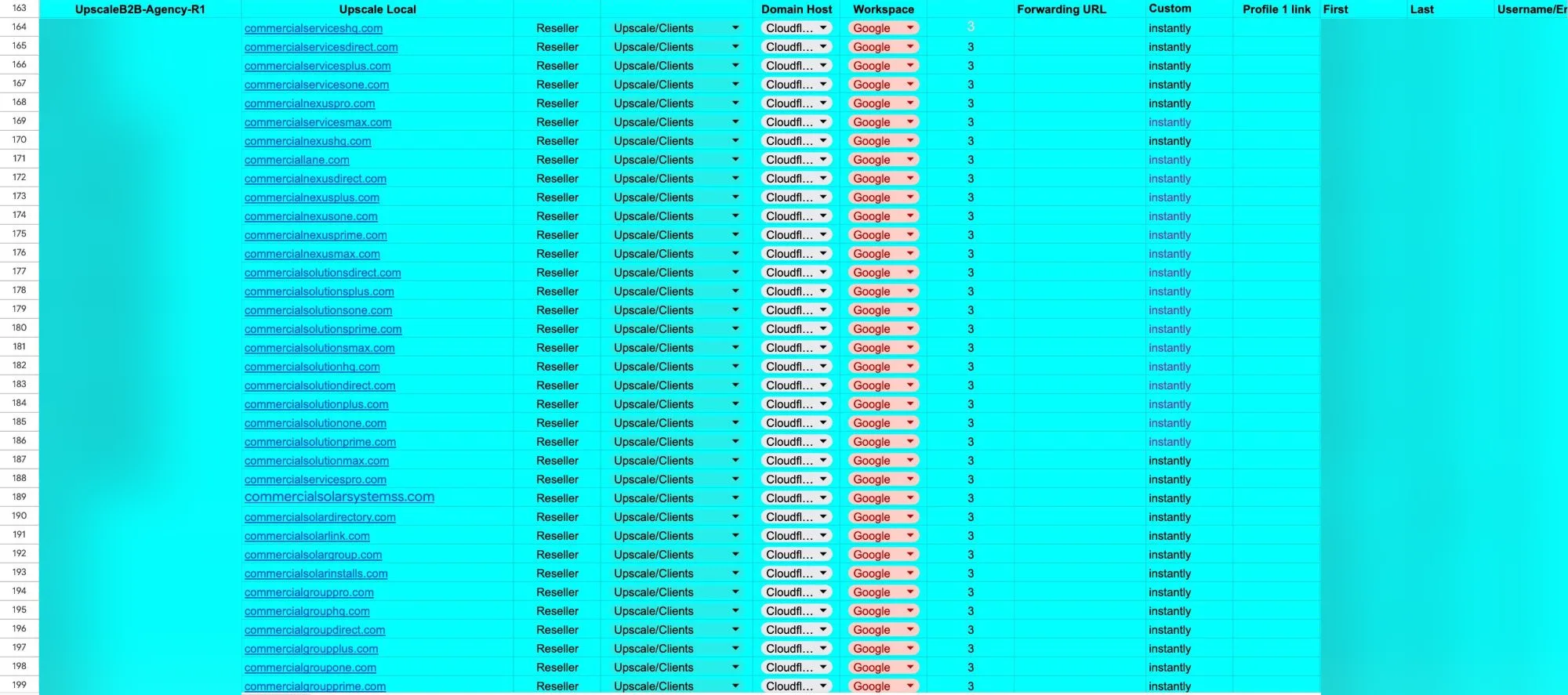
300
Google Workspace inboxes on 100 domains
12 months
October 2025 to October 2026
0
domains deleted
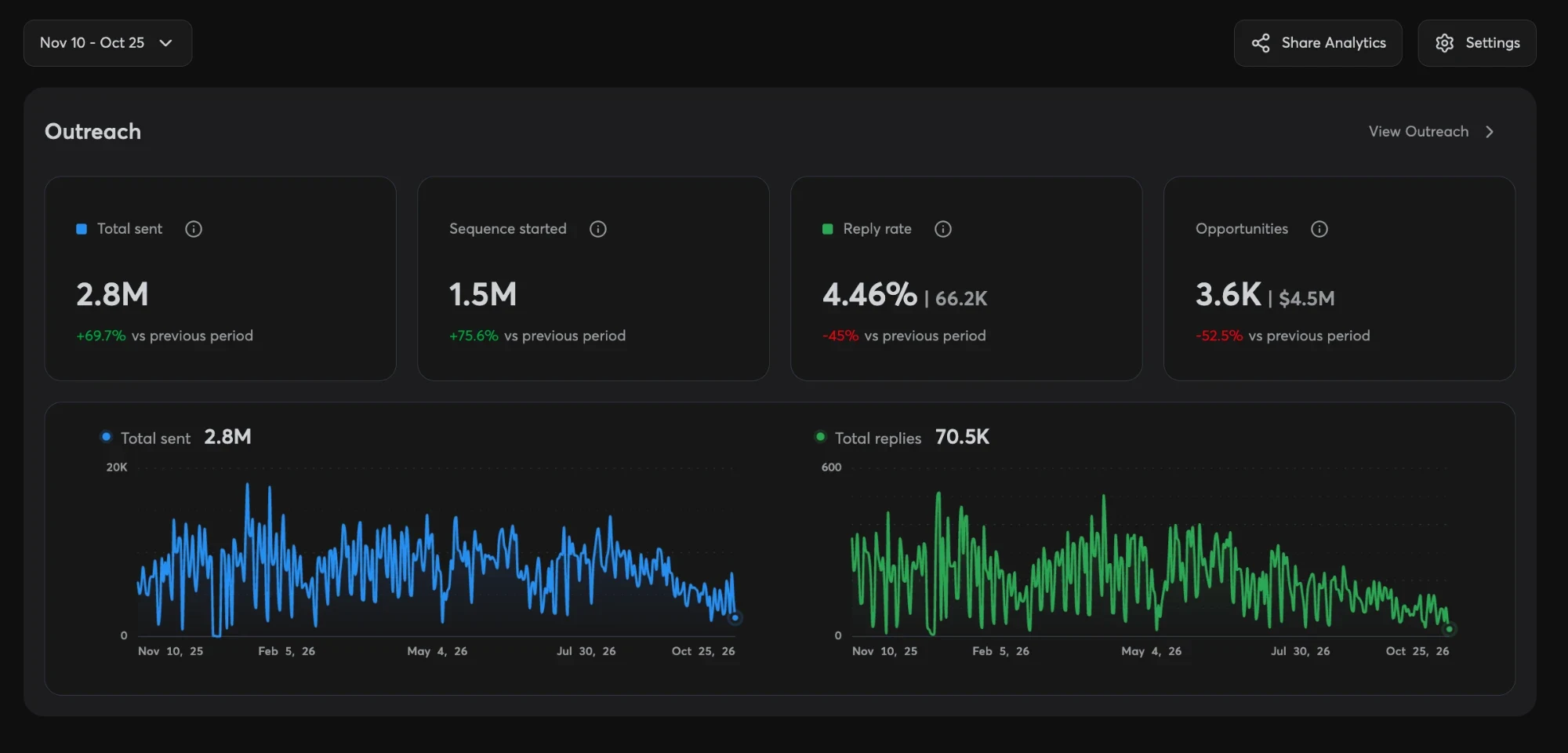
4.46%
reply rate across the agency workspace, 10 November 2025 to 25 October 2026
The reply rate is from our sequencer dashboard for the same window, and it covers every campaign in the agency workspace, not this cohort alone. The 3 client programmes this cohort sent for made up the bulk of it. In all, the workspace logged 2.8M emails sent, 1.5M sequences started, 66.2K leads replied (70.5K replies in all) and 3.6K opportunities logged. Here is the dashboard itself:
Here is what we did.
1. Warm rotation
The first and biggest thing. Half the inboxes carry new outreach while the other half rest on follow-ups, then they swap. We swapped every 2 weeks.
- Take your total inboxes and divide them in half.
- Tag one half Batch 1 and the other Batch 2 in your sequencer.
- Add both batches to the campaign.
- Run the active batch at full daily limits and lower the resting batch to follow-ups only, by selecting its tag in the inboxes section and changing the limits.
- At each swap, raise one tag and lower the other. Nothing is removed from the campaign, so the resting batch's follow-ups keep going out.
Drawn out, the year looked like this, fortnight by fortnight:
Set A
Set B
Set A
Set B
Set A
Set B
Set A
Set B
Every 2 weeks for the whole run, on all 300 inboxes, 150 to a batch. The pattern repeats; four periods are shown.
Here is what one inbox sent in a day on each side of the swap:
| Per inbox, per day | Cold | Warmup | Total |
|---|---|---|---|
| Sending batch (new outreach) | 15 | 33 | 48 |
| Resting batch (follow-ups only) | 6 | 44 | 50 |
Neither side goes past 50 emails a day, which is where Google starts refusing sends. The resting batch is not silent: it keeps its follow-ups going and does most of the warmup, so it comes back to new outreach having spent its rest on warmup. Changing both tags' limits at every swap, across 300 inboxes, is the kind of job that gets skipped by hand; ours ran through the Deliverability Monitor's AI automation.
Rotate lead lists the same way: a list Batch 1 worked this month is worked by Batch 2 next month, from different senders, which reaches more of the list without the repeat contact that gets reported as spam.
The full method, and how often to swap for your sequence length, is on warm rotation. The rotation planner builds the batches for you.
2. Monthly placement tests, and the rejuvenation protocol
Once a month we ran placement tests across the fleet. Not as the truth, for the reasons above, but as a smoke alarm. Every one we run on the inboxes we build is published in the inbox placement log. Any inbox that came back 100% spam went into the rejuvenation protocol, and there were very few:
- Keep the domain. Delete the inboxes on it.
- Create new inboxes on the same domain, with new names.
- Warm them up for a week.
- If they test well by the end of that week, put them back to work, ramping at 5, then 10, then 15.
- If they don't, delete the domain.
Across the whole run we did not have to delete a single domain. Reputation sits mostly with the domain, which is why recreating the mailbox works more often than people expect; the reasoning is in one inbox not getting replies.
3. Change the copy and the offer at every swap
Every rotation of the clock, the copy changed and the offer changed with it. The same person never got the same offer again and again.
The lists rotated against the batches too. If someone was contacted by Batch A this month, next month the same person heard from Batch B, and the month after from Batch A again. Nobody got hit by the same domain twice in a row.
Inside each email we used a lot of spintax, so no two sends read identical. Test every variant with the spintax tester before it goes out, and see spintax vs AI copy and the Liquid syntax guide for how we write it.
4. Double-verify every list, and segment it first
- Segment by provider first with the ESP segmenter. It reads every domain's MX records, and addresses on domains with no mail server come out before you pay to verify them. On our lists that has saved roughly 10% of verification spend.
- Verify the Google-hosted addresses twice: first through a cheap verifier, then through a catch-all verifier for the ones the first could not decide.
- Then verify everyone else.
The waterfall calculator plans the two passes, and the segmentation playbook goes through the whole list process.
5. Send each prospect from the right platform
Google-hosted recipients are sent from Google Workspace; everyone else (Microsoft 365, other providers and gateway-protected domains) from Azure. That is the rule we ran the whole year, and the Azure tenant study is why we keep Azure tenants light. This Google cohort sent to Google-hosted prospects from day one. It sent nothing to Microsoft-hosted prospects until each domain was past 6 months old.
And we never sent to secure email gateways: Proofpoint, Mimecast, Barracuda, you name it. Every time we have tried, results were worse and domains burned faster, so we took them out of every list. That is our observation from our own fleets, not a published measurement, and it is a big part of why these domains lasted a year.
6. Monitor both: placement tests lead, reply rates lag
We tracked the reply rate on every inbox and domain against its own baseline, and ran placement tests so we did not have to wait for it: the test is the leading indicator, the reply rate the lagging one that confirms it. When either moved we ran the recovery protocol above that week, not the month after.
Use the Deliverability Monitor for this. It is free, it works on inboxes wherever you bought them, and it is what we ran this cohort on in beta: blacklists, SPF, DKIM, DMARC and expiry checked daily, and sent, replies and bounces per domain over 7, 30 or 90 days, so a drop shows against that domain's own numbers. It is in closed beta, so request access on its page.
Until you are in, a spreadsheet works: replies per inbox per week, and a flag when one falls well under its own last four weeks.
The warmup pool, eleven months in
Warmup never switched off. Here are 7 inboxes from the cohort, from their warmup panels for the week of 13 to 19 October 2026, each started about eleven months earlier. The whole batch of 300 read the same way that week; these seven are the ones we screenshotted:
| Inbox | Warmup started | Sent | Received | Saved from spam |
|---|---|---|---|---|
| Address not in the panel | 27 Oct 2025 | 312 | 377 | 0 |
| [email protected] | 27 Oct 2025 | 337 | 337 | 0 |
| [email protected] | 27 Oct 2025 | 333 | 405 | 0 |
| [email protected] | 27 Oct 2025 | 307 | 382 | 0 |
| [email protected] | 27 Oct 2025 | 316 | 391 | 0 |
| [email protected] | 29 Oct 2025 | 315 | 394 | 0 |
| [email protected] | 6 Nov 2025 | 240 | 196 | 0 |
| All 7 | 2,160 | 2,482 | 0 |
2,482 warmup emails reached the 7 in a week and not one had to be pulled out of spam. 6 of the 7 received at least as much warmup as they sent, and the daily bars sat at or near the sequencer's cap of 50 a day (a little under it on the youngest), eleven months in.
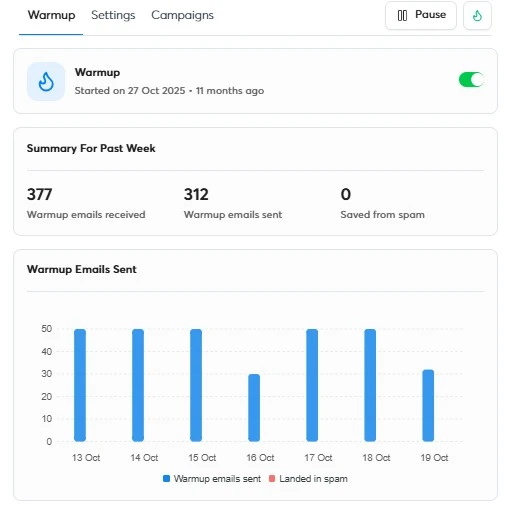
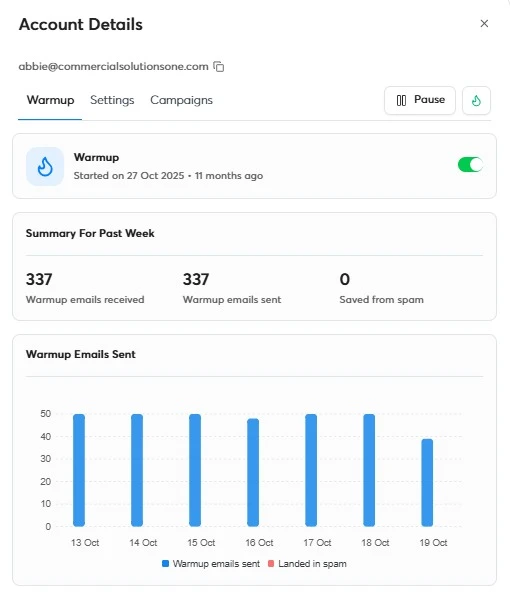
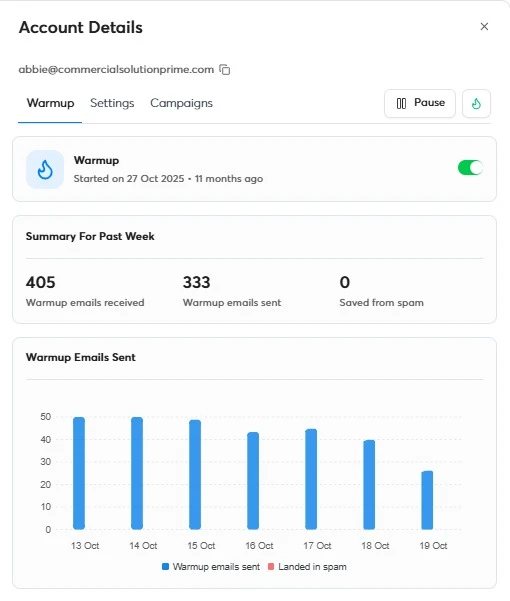
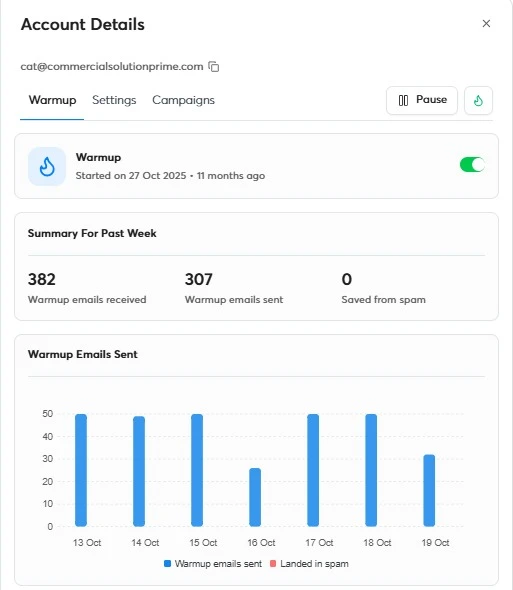
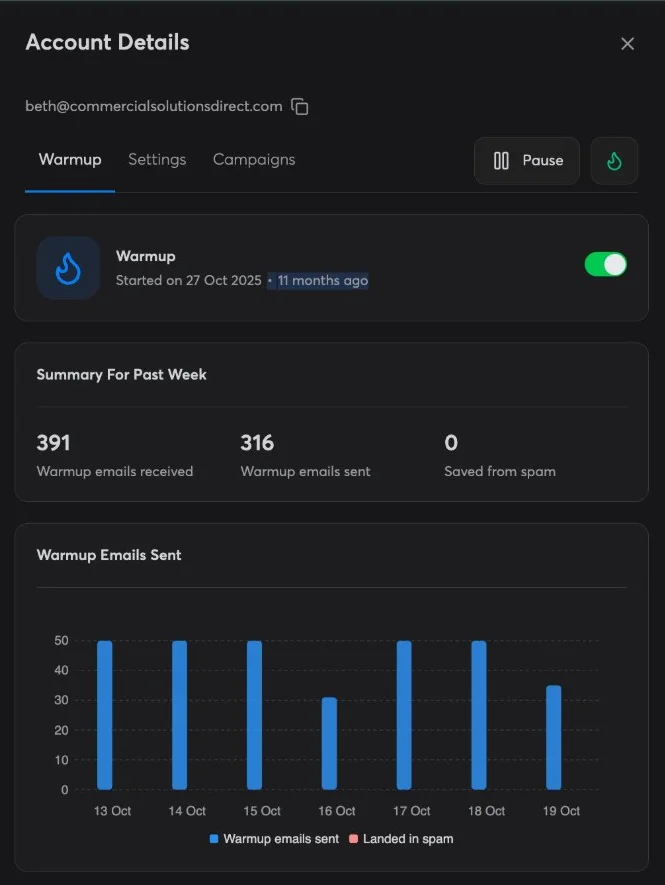
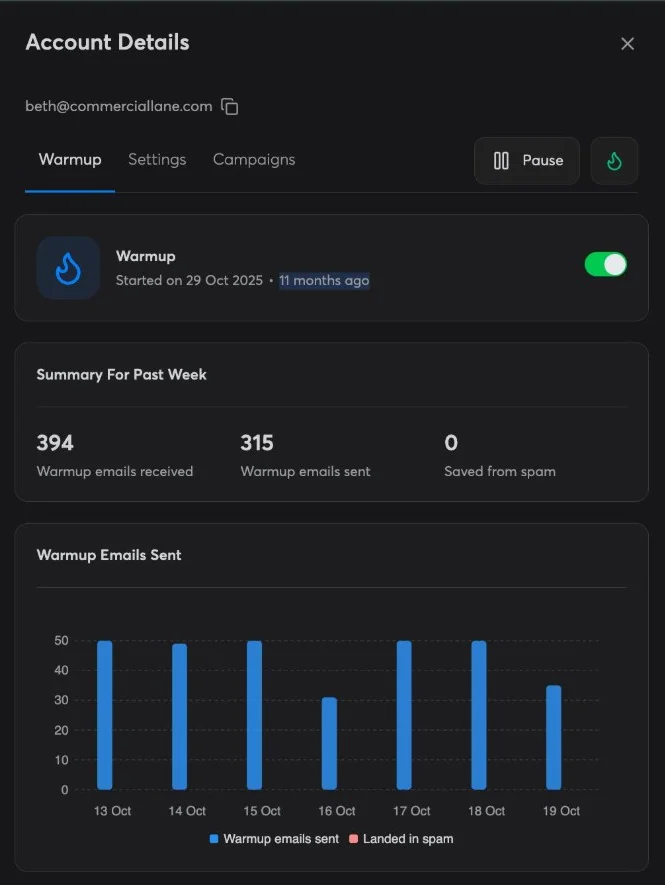
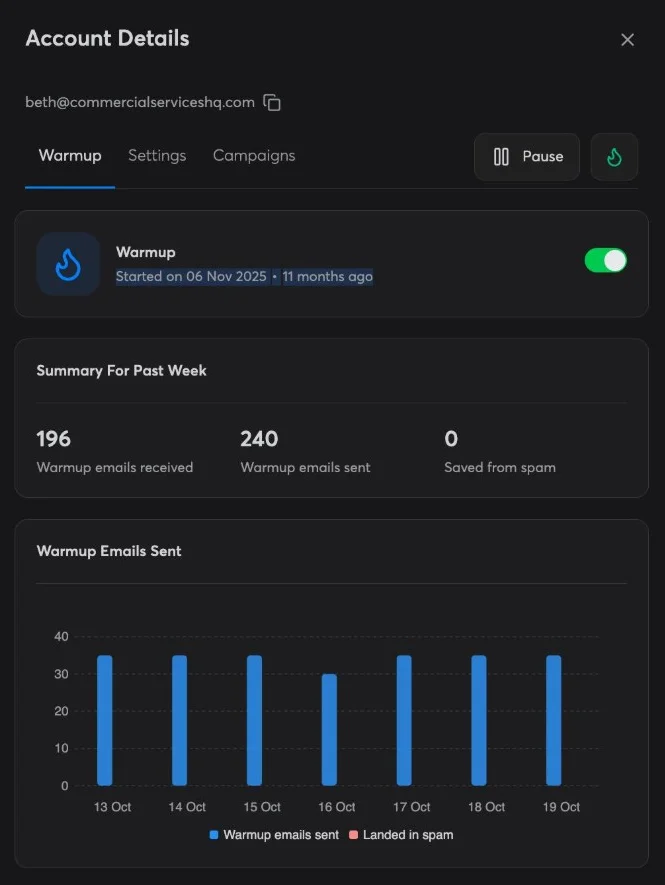
All seven panels, as the sequencer showed them. The dark ones are cropped to the account panel; nothing else is edited. Click one to open it full size. The domains have since expired.
Across the whole cohort. The rest of the 300 ran the same way, so at these seven's average this is what the fleet was doing:
~44
warmup emails sent per inbox per day (~309 a week)
~92,600
warmup emails sent a week across 300 inboxes, ~106,400 received
~4.8M
warmup emails a year at that pace
The cohort figures are the seven's average multiplied out to 300 inboxes, rounded. The yearly figure holds one October week's pace for 52 weeks, which overstates the first weeks, when warmup ramps up from nothing.
Remember what this does and doesn't tell you: it shows the inboxes are alive and their warmup is landing, not that cold email to real prospects is. That is still the reply rate's job, which is why the Deliverability Monitor watches replies and not warmup scores.
The short version
- Steer by placement tests (best of three, real inbox, real copy) and judge by the reply rate against its own baseline; never by warmup scores or one test.
- When it drops: cold sending to zero, a week of warmup only, test to yourself, then ramp 5, then 10, then 15.
- Run warm rotation, and change the copy and the offer at every swap.
- Rotate lists across batches so nobody hears from the same domain twice in a row.
- Segment by provider, then double-verify. Never send to secure email gateways.
- Send Google-hosted prospects from Google Workspace, everyone else from Azure.
- Hold a new Google domain back from Microsoft-hosted prospects until it is past 6 months old.
- Rejuvenate before you replace: new inboxes on the same domain, a week of warmup, then decide.
Go deeper
The studies behind it
- Every placement test we ran on prewarmed inboxes · 469,331 messages scored
- A study of TLDs for cold email, ranked by how often they recur on abuse lists · 52 TLDs rated against abuse sources
- Microsoft’s Azure tenant crackdown and the 550 5.7.237 bounce: what three fleets showed · 0 tenant blocks at 25 users per tenant
- A study of top-level domains by sends · 16× .link against .com
- Does a SURBL listing actually hurt cold email? We tested 2,817 sending domains · 2,817 domains tested
Free tools for each step
Add the free Deliverability Agent to your AI
Ongoing QA and advice for your cold email, to the best of our knowledge: ask it what is wrong in your own words, and it runs the checks, reads them against our published research, and tells you the fix. Works in Claude, ChatGPT, Grok and Cursor. Free, no account, no API key.
Add it to your AIRuns on WarmInboxes Free MCP. Need inboxes? Get prewarmed and fresh inboxes.
Prewarmed & Fresh Inboxes
Google, Microsoft 365 and Azure inboxes with free prewarmed domains and DNS configured before you log in. Prewarmed inboxes send the day they land; every order is delivered within 48 to 72 hours.
Get Prewarmed & Fresh Inboxes